Friday, August 8, 2014

Getting Your Letters On Straight

School starts in FIVE DAYS!!!  I'm a little crazy right now. . .

I've got the bulletin boards up.  One of the things I have the hardest time with is getting my bulletin board letters straight.  I will eyeball them and they'll go up, or they'll go down, or they'll be wavy. . . but they're never straight across.  Never.

I finally figured it out.

Tape.  Tape is my friend.


It's kind of hard to see on my photo, but that's masking tape right across the front of the letters.

Let me first say that you can only do this on blank walls or FABRIC backed bulletin boards.  I use fabric because it's fun, reusable and doesn't fade.

If you use paper backed bulletin boards, this will rip your paper.

First, line up the letters on something straight.  I use the edge of my desk.

Rip off a piece of masking tape to cover all your letters and lay it over the top.

You can now pick up the entire word and transfer it to your bulletin board.

Adjust.  Adjust again.  Adjust again.  And, if you're me, adjust one more time.

Staple one staple above, and one below the tape line.  Pull off the tape.

Done!  Straight letters!

Thursday, July 31, 2014

Please Sharpen

Just a quick posting today!  I stole this idea from another teacher in the building. . .
The picture is very bad!  I need to take a look at the camera!

The idea behind this is that the pencils are returned to the Sharp Pencil bucket, unless they need to be sharpened.  Then they go in the Please Sharpen bucket and I will do it when I get time. 

The buckets are a dollar from the Dollar Store and I made the labels on Word. 

We're starting up in ten days!  I will post bulletin boards soon!

Monday, June 2, 2014

My Favorite Online Field Trips

I briefly touched on online field trips in the last post I did but, in rereading it, I decided I didn't do it justice.  It's one of my favorite things to do with my students at the end of the year.

Online field trips are a great way to explore and learn, all without leaving your seat!  When I do my lesson on online field trips, I show the kids my Tizmos site with all the links.  (Online Field Trips)  I give them a brief synopsis of all the online field trips that I have on the site and then I spend fifteen minutes showcasing two sites.  After that, I let the kids go for it and explore!


1.  San Diego Zoo.  This is my all time favorite field trip.  They have live animal cams in some of the animal habitats, informative and fun videos highlighting different animals, information on different zoo jobs, activities and games.  The kids would spend WEEKS on this site if I let them!  It's well done, easy to navigate and incredibly interactive.

2.  Smithsonian.  This site is a virtual tour of the Smithsonian's Natural History Museum.  I show the kids how to move the camera, go from room to room and how to use the map.  As a class, we visit the Hope Diamond and look at the dinosaurs.  The students go from there.

3.  The U.S. Mint.  This isn't as interactive or as fun as the zoo, but it still has some great information and some good games that are educational.  The students really love making their own coins or looking back at the evolution of our money.

4.  The American Museum of Natural History - Ology.  This site has a great "ology" section where students can explore different areas of science.  The students can click on an area of study on the left of the screen.  It will take them to a new page with lots of activities, games and quirky information. 

5.  University of Colorado Science Experiments.  This site has TONS of science experiments and simulations for students to explore.  It's a fun, interactive site.

I have a lot more sites on my Tizmos site and you are welcome to use those links in your classroom.  These are my top five favorites. I always do the online field trips as the second to last class of the year.  By this time, students are ready for a break and this is a fun way to give them this break but to keep them learning. 

Enjoy!


Sunday, May 25, 2014

Online Field Trips Bulletin Board

Each year I spend a week with the students taking online field trips.

There are some really great sites out there that are perfect for online field trips.  The sites are interactive and interesting and the students have fun exploring them.  My all time favorites are the San Diego Zoo and the virtual tour at the Smithsonian.

You can find all the sites I like to use HERE.

This site is a Tizmos site.  It's like an online library where I dump websites.  I put the link to my Tizmos site on to the students desk top at the beginning of the year.  I use this almost daily.

During free time, they can go to their grade level tab and play those games.  If they need to play a typing game, they click on that tab.  There is an online field trip tab and the home tab is where I put sites that I am using for just a week or two.

The site is easy to maintain.  I put in the link for the site I want to show on my tizmos page and it's available to the kids.  The kids don't even have to log in to use my site.

The way I have it set up, it costs $3 a month (I think. . . )  You can have a free tizmos site with no tabs and twenty links if you are interested in trying it out.

Here is the bulletin board I put up.  I will have a tutorial on how to make the flowers on my other site, www.creativethriftiness.com, within a week.  You can find that site by clicking the tab at the top of this page.


You can find a copy of the handout I put in the pocket here:  ONLINE FIELD TRIPS

It also has a copy of my tizmos page address.  You are welcome to use it!

Happy Summer!!!


Monday, April 7, 2014

The Rest of the Story

Actually, it's the rest of the bulletin boards.  I forgot to photograph the laptop lab.

Without further ado. . .

Same iPad.  Same images as from second quarter.  The font is from Word, printed and cut out, then pasted on to construction paper before being laminated.  The DIGITAL FOOTPRINT is a collage of social networking site logos that I found online.  I used it as fill for my letters.

The Cyberbullying poster on the left is from last year.  The hand one's link is in the post below this one.  The letters are hung up on twine, quite crookedly, I see.  It's a font that I printed and cut out.  I think it's called SQUARED or something.  It was by far the fastest cut out job I've done on letters!

There it is!  The rest of the story! 

I shall do one more bulletin board in the hallway this year but I'm going to wait until next week, or maybe the week after.  I have stuff going on and I'm tired of being creative.  And I have a cold.  Poor me!

Enjoy Easter!

Monday, March 31, 2014

Fourth Quarter Bulletin Boards

What's that they say about the best of intentions? I have lesson plans I meant to put up here and haven't.  Like everyone else, I've been busy!

Here are some of my bulletin boards for fourth quarter.  I have a few more that I'll photograph and put up in a few days.

**As always, you are welcome to use my work to make posters.  I've put links to some of the posters below.  Please don't sell my work.  It's mine!

This poster is from last year.  The surfer is Word clip art, enlarged.


The Cyberbullying posters were made in Word.  You can find them here and here.

This one hangs in the laptop lab.


The Safe Internet Surfing one is in the hallway.  This one was so fun! 
Those little text boxes are different safe internet surfing tips like "Never give out your personal information online."  I used a cheap tiki from the party store.  The palm tree is made with green card stock that I cut out in a leaf shape and painted different green colors.  The surfboard is made out of cardboard.  The backdrop is pale blue fabric that I painted clouds on.  I actually have grass painted underneath the water.  The water is blue paper that I also painted.  The sand is poster board that I spray painted with a textured spray paint.  It looks like sand up close. 

I will post the rest of the laptop lab posters later this week.  Hopefully, I will get some lesson plans up!

Jennifer

Thursday, January 9, 2014

Third Quarter Bulletin Boards, Continued

Last year I made a large, 3D keyboard out of take out boxes.  I ended up redoing it this year because it didn't store well.  I will have to figure out a better way to store it this year.  I'm thinking I may need to cut the big keyboard in half and just hang it together next year.  Thoughts?

Since I was cutting and gluing styrofoam boxes, I went ahead and made the whole keyboard this year.  The "Your Fingers Have a Home" letters are the same ones I used last year.


This next bulletin board hangs in the hallway.  I'll change it out mid February, maybe.  I like it too much to give it the axe in three weeks!

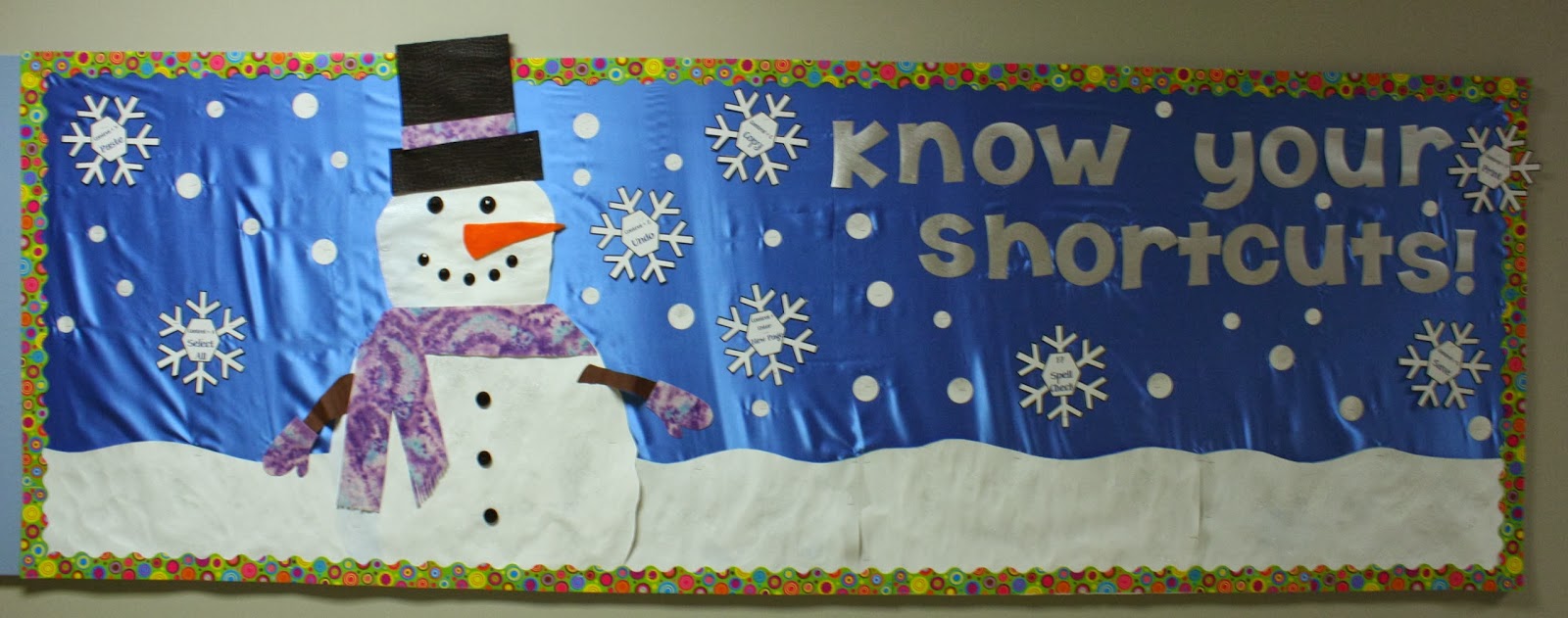
The snowflakes have Office shortcuts in there.  If you're interested, let me know and I'll make a point to put the PDF of the snowflakes up.  I printed them on regular white card stock and cut them out one night while I was watching an NCIS marathon.  It made the job less painful!

The snowman is on poster board that I painted and sprinkled with glitter before cutting out.  The paint is just some white paint squirted on the card stock and schmered around to give a bit of texture.  I free handed the snowman. . . he's missing a waist.  Whoops!  The scarf and mittens are made out of felt.  The hat is also felt.  The eyes and buttons are those flat, plastic "crystals" and the nose is also felt.  I found all this stuff in my crafty hole corner of the basement. 

The letters are printed in reverse on silver scrapbook paper.  I printed it on the back so that the ink wouldn't smear, which is why I printed it on the reverse.   The backdrop is some very, very cheap clearance fake satin that was on clearance at WalMart for a buck a yard.  I will probably not be able to reuse it because it snags and has holes from the staples.  Cheap, very cheap!  The little round snow blobs are white card stock I sent through the laminator.  I sprinkled it with glitter before sending it and then punched out two sizes of circles from the paper. 

Close up, this looks pretty awesome.  I'm not sure how well it will hold up over the month and a half I'm hoping to get out of it.  I'll let you know!

Welcome back to school!!!